
Welcome to Complete Members
Complete Members is a self-hosted platform that runs an unlimited number of websites - membership sites and paysites, digital-download and physical stores, and plain websites - each on its own domain, all from one central hub, with one or more affiliate programs (pay per sale or per click) and billing across many processors.
How the pieces fit together
- The hub is the admin, the database and the API. You install it once on your own hosting.
- Each website runs on its own domain through a small connector you download from the hub and upload to that domain.
- Billing connects your processors and takes payments on their hosted pages, so card data never touches your server.
- The affiliate program spans every site, so one link earns on joins, rebills and store sales anywhere in your network.
This guide covers the hub admin. For task-by-task walkthroughs with background and tips, see the Guides.
Requirements
| Item | Requirement |
|---|---|
| PHP | 8.1 or newer, with pdo_mysql, mbstring, openssl, sodium, curl, gd, fileinfo and json. |
| Database | MySQL 5.7.8+ or MariaDB 10.3+. |
| HTTPS | Required in production, on the hub and on every site domain. |
| Hosting | Ordinary shared hosting is fine - no Composer, Node, Docker or shell access needed. |
| Cron | One job every few minutes (or a URL scheduler) for scheduled work. |
Installing the hub
- Upload the contents of the
hub/folder to the domain for your admin, soindex.phpandinstall.phpsit at the top. - In your control panel, create an empty MySQL database and a user with full rights on it.
- Open
https://yourhubdomain/install.php. The wizard checks requirements, takes your database details and creates the tables, sets your hub address, name and currency, creates your owner account, and takes your Installation Key API key. - When it finishes, delete
install.phpfrom the server and make sure HTTPS is on. - Add the cron job (see Settings) so scheduled work runs.
When you later re-upload the hub to update it, never overwrite config/config.php, config/service.php, config/installed.lock or the storage/ folder.
The hub dashboard
Sign in with your owner account and you land on the dashboard: an overview of revenue, active members, sales and affiliates, with your sites listed and anything that needs attention flagged.
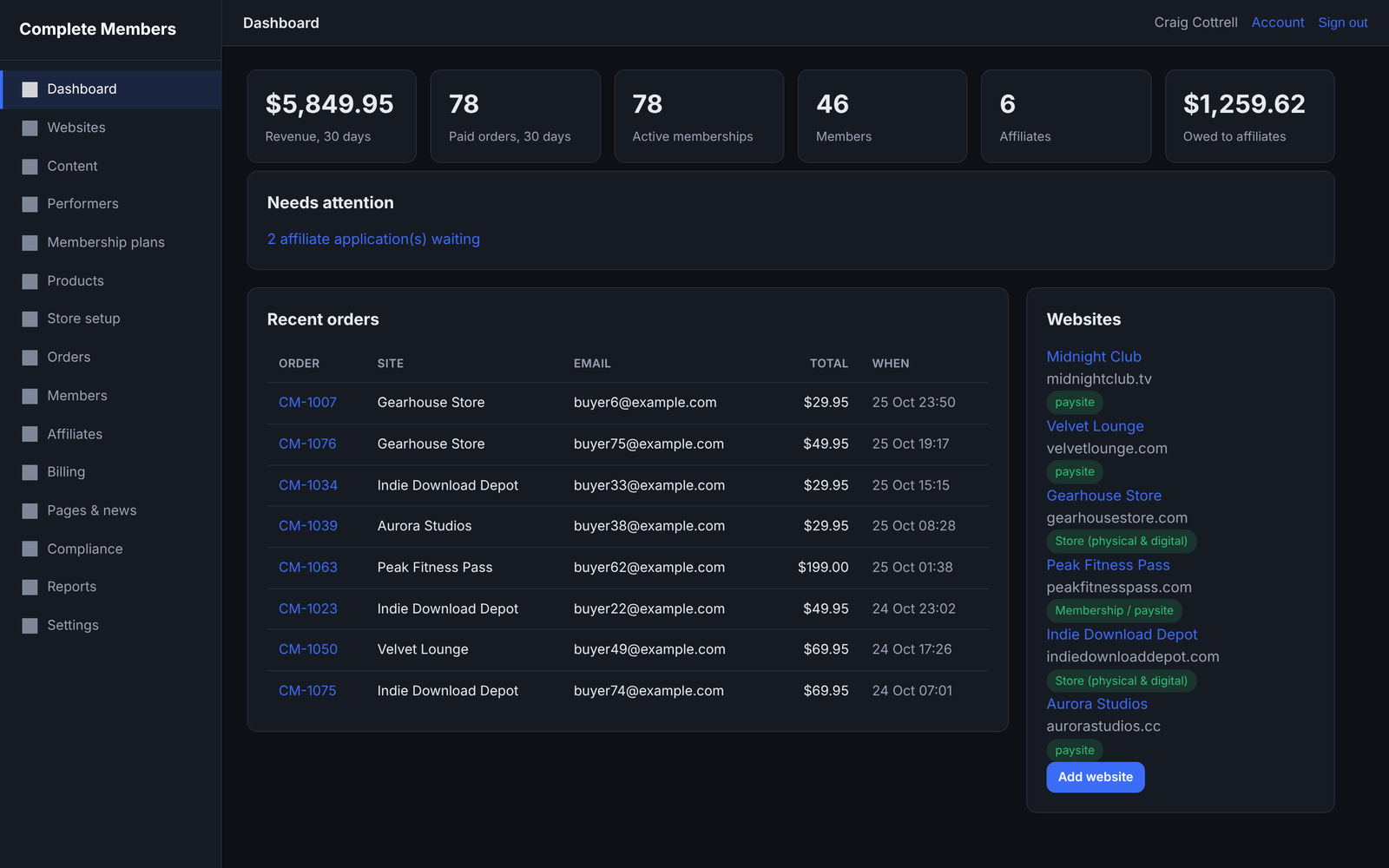
The left-hand menu takes you to each area: Websites, Billing, Membership plans, Content, Performers, Products, Affiliates, Reports and Settings.
Websites & connectors
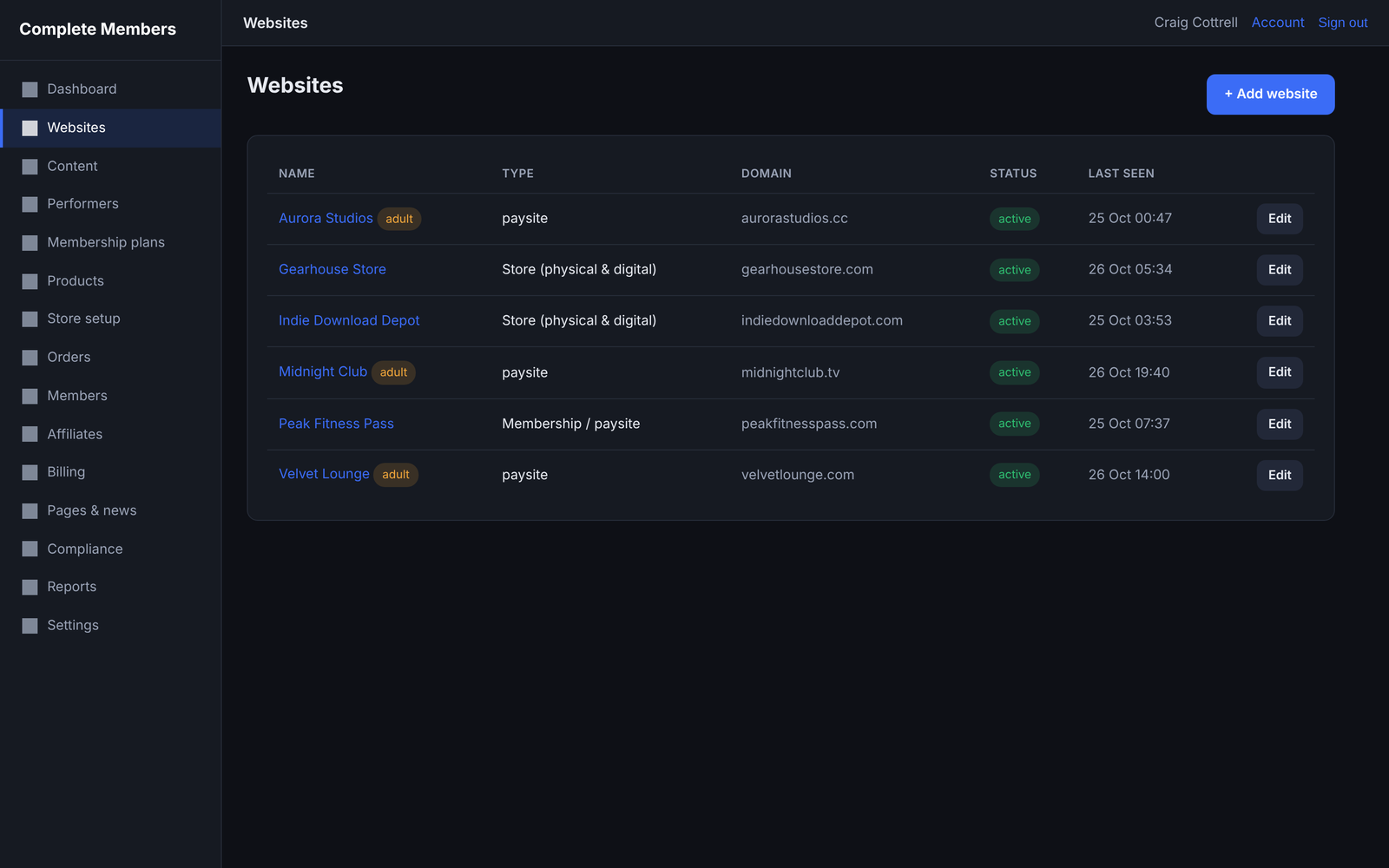
Each website runs on its own domain and talks to the hub. You add it in the hub, then upload a connector to the domain.
- Go to Websites → Add website and choose the type: membership, download store, physical store, affiliate portal or plain website.
- Enter the site's domain, and tick adult if it is an adult site.
- On the saved page, click Download connector .zip.
- Upload the contents of that zip to the root of the site's domain, so
index.phpis at the top. Itsconfig.phpalready holds that site's keys. - Visit the site - it renders using content and settings from the hub.
To change a site's look, edit templates/theme.php and templates/style.css on that domain. Connector updates never overwrite the templates folder.
Billing & processors
Open Billing. For each processor you have been approved for, click Configure, enter the credentials and tick Enabled. Then give the processor its postback / webhook URL, shown on its page.
| Processor | Typical use |
|---|---|
| CCBill, Epoch, Verotel, Segpay | Adult / high-risk memberships and rebills. |
| PayPal, Stripe | Mainstream stores and memberships. |
| NOWPayments, CoinPayments | Crypto. |
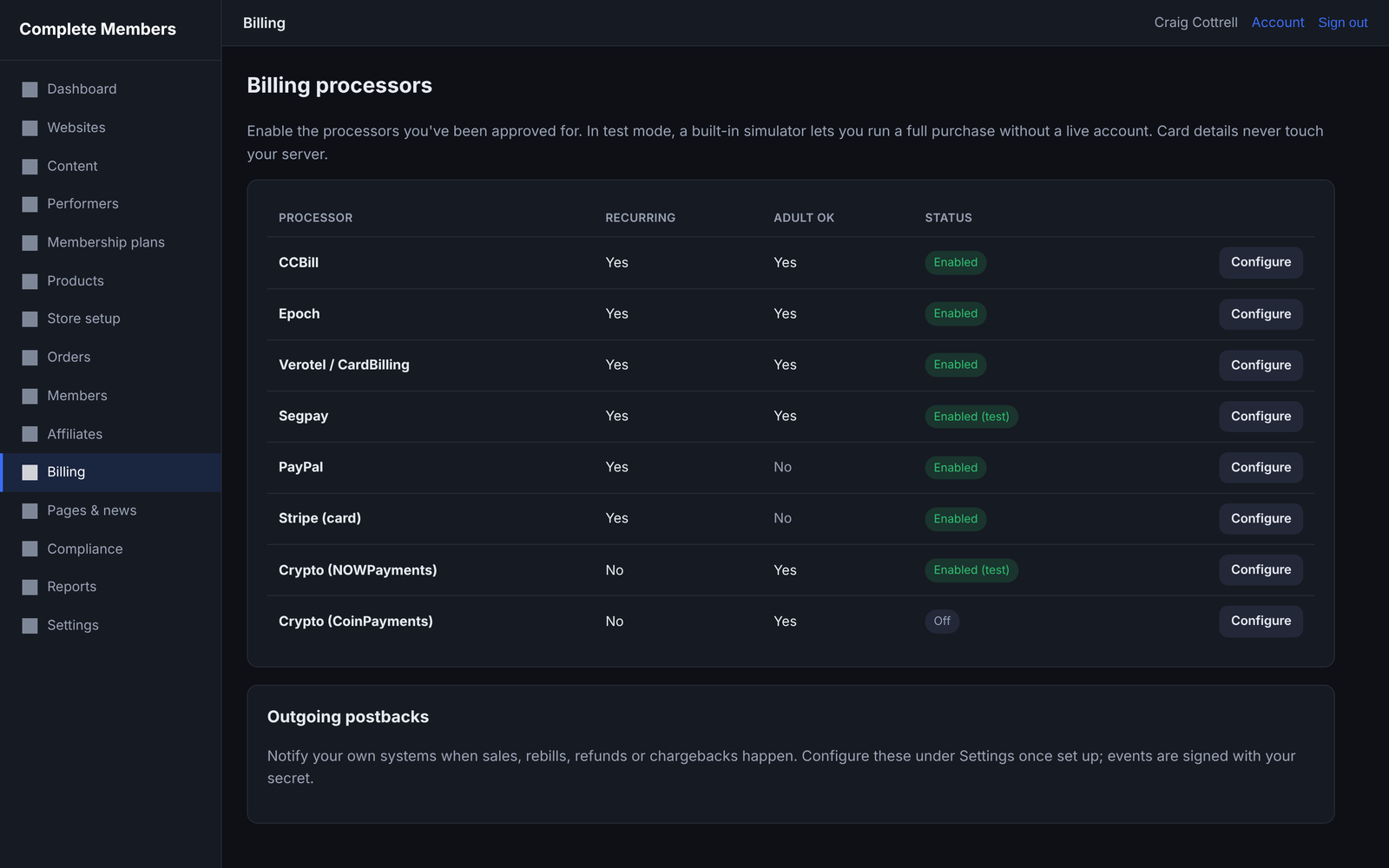
Leave Test mode on at first. The built-in simulator runs a full join, rebill, refund and chargeback without a live charge. Card details are always entered on the processor's hosted page.
Membership plans & content
Under Membership plans, create plans with a price and period, and choose which sites each plan grants access to - one site, or all of them for a network pass.
Under Content, create sets, upload images and video, attach performers and assign the set to sites. Set a release date to drip-release it automatically, or publish now. You can send content for review before it goes live.
Rebills extend access automatically; expiries and cancellations remove it. The hub's scheduled job (your cron) handles this.
Performers & compliance
For adult content, add each performer under Performers with their 2257 identity and consent records, which are stored encrypted. A performer must be marked verified before their content can be published.
The complaints and takedown queue and age-verification hooks live alongside. These tools help you operate lawfully, but using them correctly in your jurisdiction remains your responsibility.
Products & stores
Under Products, add digital downloads (with download limits and licence-key pools), physical goods (with stock, variants and weight), or licence-key products. Under Store setup, define shipping zones and rates, tax rates and coupons.
Digital and physical products share one catalogue and one checkout, so a customer can buy either the same way, through any of your connected processors.
Affiliate program
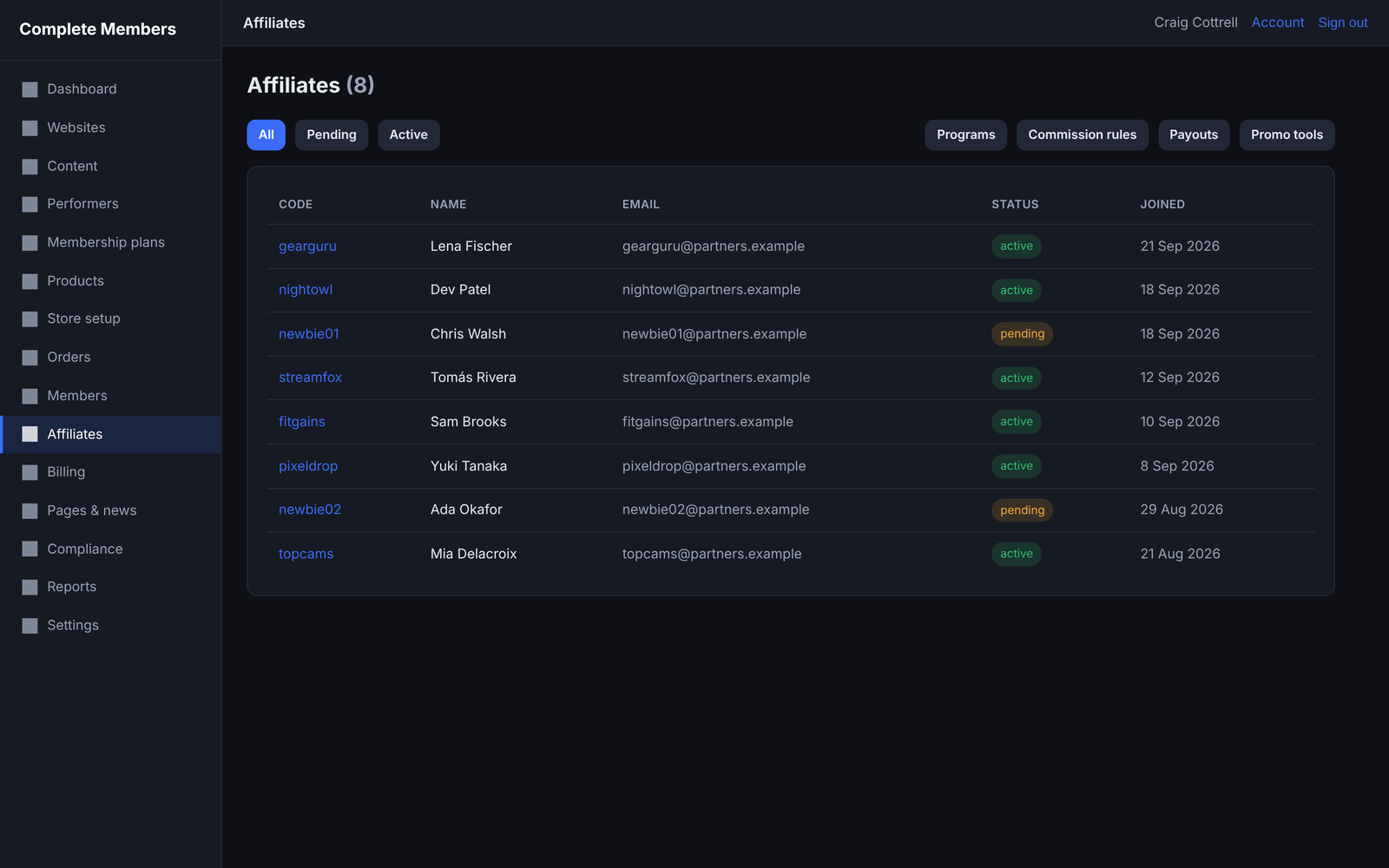
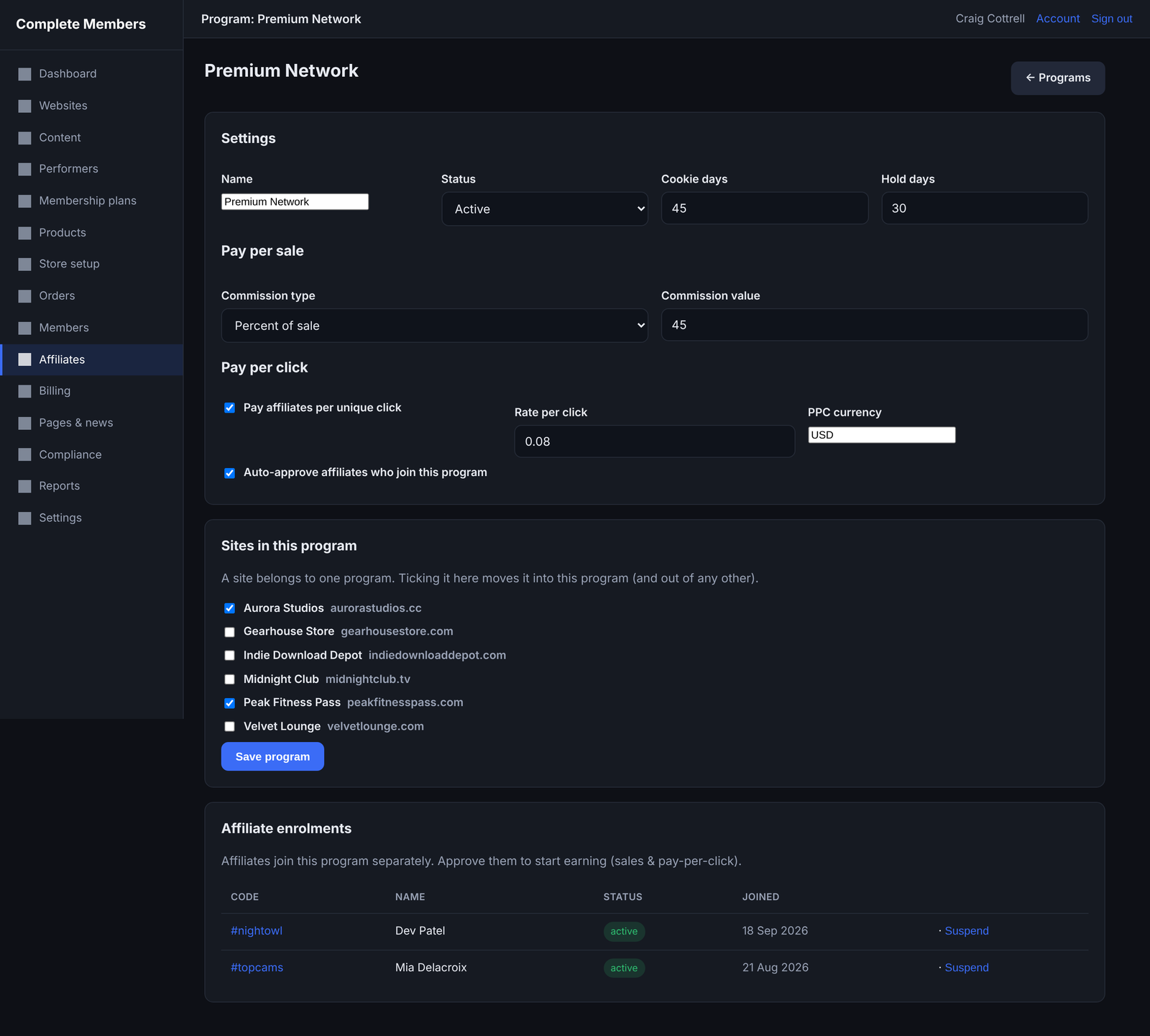
Open Affiliates. Under Programs you can run one program or several: each program owns a set of your sites, sets its own sale commission and - optionally - a pay-per-click rate, and affiliates join each program separately (approve them per program before they earn). Set default and tiered rules, review applications, and generate payouts. Add banners and text under Promo tools for affiliates to use.
Commissions move from pending to approved to paid; a refund voids or claws them back. Self-purchases (buyer details matching the affiliate's) are detected, the commission cancelled and the affiliate frozen for your review. See the guide on payouts and fraud.
Each program sets its own pay-per-sale commission (a percentage - which also pays out on every recurring rebill, not just the first join - or a fixed amount) and, if you switch it on, a pay-per-click rate for every unique click sent to that program's sites. You choose which sites belong to each program and approve affiliates per program.
Settings & the cron job
Under Settings you set your hub name, currency, email, security options and the cron key. One cron job runs the scheduled work - expiring memberships, approving commissions, retrying emails and postbacks, and the daily licence re-check:
| Shell / cron access | */5 * * * * php /home/youruser/yourhubdomain/cron.php >/dev/null 2>&1 |
|---|---|
| URL scheduler only | Fetch https://yourhubdomain/cron.php?key=YOURKEY every few minutes after setting cron_key. |
Licence & Installation Key
Complete Members is licensed per hub domain with an Installation Key, included in your purchase email. You enter it during install, or at any time on the Licence page in the hub.
- Open Settings → Licence (or run
install.phpon first install). - Paste your Installation Key and click Activate. The hub checks it with the licence server and confirms.
- The hub re-checks your licence quietly each day; an activated copy keeps working if the server is briefly unreachable.
Lost your Installation Key?
Look it up or have it reissued at installationkey.com - it's quicker than contacting support.
Updating
Updates are free. Upload the new hub/ files over the old ones, but never overwrite config/config.php, config/service.php, config/installed.lock or the storage/ folder. install.php will not run again once installed. Database upgrades apply themselves on the next admin page load.
For connectors, upload the new files over the old ones on each site, keeping that site's config.php and its templates/ folder.
Troubleshooting
The install wizard won't load or finish
Check your PHP version and extensions on the requirements screen, and that the database user has full rights on the database. If the wizard already finished once, install.php is locked by config/installed.lock - manage the hub from index.php instead.
My Installation Key isn't accepted
Copy and paste it exactly from your purchase email, and make sure the hub can reach the internet. If it says the key is in use on another domain, deactivate it there first, or contact support.
A site shows a connection error
Make sure you uploaded the connector's config.php along with the rest, that the site is reachable over HTTPS, and that the hub domain is online. The connector talks to the hub over a signed API, so both ends need HTTPS.
My site design changes were lost after an update
Design lives in templates/theme.php and templates/style.css on the site. Connector updates don't overwrite the templates folder, so check you didn't replace it by hand.
A test payment didn't grant access
Confirm the processor is Enabled and in Test mode, and that its postback URL is set on the processor's side. Watch the payment log in the hub as you test - you should see each event arrive.
An order is stuck on "review"
The amount or currency didn't match the expected price, so the order was held rather than delivered. Check the order's note, and the processor's reported amount.
Memberships aren't expiring / commissions aren't approving
Those run from the cron job. Check it is set to run every few minutes and that it points at cron.php (or your cron.php?key= URL). See Settings.
Frequently asked questions
Is there a limit on sites or members?
No. The licence places no limit on the number of sites, members or customers - only what your hosting can handle.
Does card data touch my server?
No. Payments are taken on each processor's hosted page and confirmed by verified postback, so you stay out of PCI scope.
Can one plan cover several sites?
Yes. A plan can grant access to a single site or to all of them, so you can sell a network pass.
Where do I manage everything?
From the hub admin. Each site pulls its content and settings from the hub; you rarely touch the site files after uploading the connector.
Contact support
Most questions are answered in Troubleshooting, the FAQ and the Guides. Lost your key? Try installationkey.com first.
To contact us, use the support form at www.easiersoftware.com/support. Include the email you bought with, your hub domain, what you were doing and the exact message you saw.
Never share your full Installation Key or API key publicly. Support may ask for them privately to look up your licence.
Refunds, EULA, terms & privacy
Your use of Complete Members is covered by the Easier Software License Agreement (EULA). The official policies are on the pages below.
Nothing matched your search. Try a different word, or ask us.